

By the Top AI Tools for Realtors editorial team
12 years in the business · virtually staged hundreds of vacant listings · Last updated July 2, 2026
More than 95% of buyers start their home search online, and an empty room photographs cold — buyers can't tell if their sofa will fit or picture living there. That's the whole job of virtual staging software: it digitally furnishes your listing photos so a vacant or dated space finally feels like a home, for a tiny fraction of what physical staging costs. After running the same set of empty-room photos through every major AI staging tool and done-for-you service, I've ranked the eight that actually deliver photorealistic results realtors can put straight on the MLS. Below you'll find a sortable comparison table, honest mini-reviews with US pricing, a dedicated free-tools section, the MLS disclosure rules you must follow, and how to take staged stills one step further into listing video.
The best virtual staging software at a glance
Sort any column by clicking its header, or filter by workflow type and price. Every tool below cross-links to its dedicated review. AI tools are self-serve (you upload a photo and get furniture in seconds); services are done-for-you by human designers.
| Tool ▲▼ | Best for ▲▼ | Type ▲▼ | Price / image ▲▼ | Free trial? ▲▼ | Video staging? ▲▼ | Our rating ▲▼ |
|---|---|---|---|---|---|---|
 REimagineHome REimagineHome |
Best overall AI | AI self-serve | ~$2/img | Free credits | No | ★★★★★ 4.8 |
 VirtualStagingAI VirtualStagingAI |
Speed & $/image | AI self-serve | ~$1.50/img | Free demo | No | ★★★★★ 4.7 |
 Collov AI Collov AI |
Affordable AI | AI self-serve | ~$1/img | Free tier | No | ★★★★★ 4.6 |
 Homestyler Homestyler |
Free 3D / DIY | DIY 3D design | Free | Free plan | No | ★★★★☆ 4.2 |
 Styldod Styldod |
Style variety | Done-for-you | $16/img | 1 free trial | No | ★★★★★ 4.7 |
 BoxBrownie BoxBrownie |
All-in-one editing | Done-for-you | $24/img | Free trial | No | ★★★★★ 4.6 |
 PhotoUp PhotoUp |
High-volume teams | Done-for-you | $21/img | Trial credits | No | ★★★★★ 4.5 |
 roOomy roOomy |
High-end / Matterport | Done-for-you | ~$30/img | Demo only | No | ★★★★☆ 4.1 |
Per-image prices are typical US entry points from published 2026 pricing and volume plans; unlimited AI subscriptions can drop the effective cost well below $1/image. None of these tools stage video natively — see our listing-video section for that. Confirm current pricing on each vendor's site.
The one-line verdict: pick REimagineHome for the best all-round AI staging, VirtualStagingAI for the fastest cheap one-click images, Collov for the best free/affordable AI, and Styldod or BoxBrownie when you want a human designer to do it for you.
How we tested the virtual staging tools
This isn't a scraped affiliate list. I gathered a control set of real listing photos — an empty living room, a bare primary bedroom, a dated kitchen and a vacant home office — and ran the exact same images through every tool at the same resolution. Human services got identical written briefs (modern farmhouse living room, Scandinavian bedroom). Each result was scored against six weighted criteria, then sanity-checked against agent reviews and app-store ratings.
Photorealism (30%) — correct lighting, shadows, perspective and scale; would it pass on the MLS? Furniture accuracy (20%) — believable, on-trend pieces that fit the room, not floating or clipping. Speed & turnaround (15%) — seconds for AI, hours for services. Ease of use (15%) — how quickly a non-designer agent gets a usable result. Price & value (12%) — real US cost per image and per listing. US support & MLS fit (8%) — support, disclosure-friendly workflow, output resolution.
Who we are & why trust us: Top AI Tools for Realtors is an independent AI-tools directory run by working agents. Ratings are ours and expressed on a 5-star scale. For the wider category, see our best AI tools for realtors pillar and browse every option in the tools directory.
Best AI virtual staging software (self-serve)
AI staging is the fastest-growing corner of the market and, for most agents, the right default: upload an empty-room photo, pick a style, and get a furnished image in under a minute for a dollar or two. These four lead the pack for photorealism and control.
REimagineHome — Best overall AI virtual staging
Best for: AI photorealism & design control · ★★★★★ 4.8 · Free credits, then ~$2/image

Overview. REimagineHome is the tool I reach for first. Its AI reads the room's geometry and lighting, then furnishes it with pieces that sit at believable scale and cast the right shadows — the details that separate "MLS-ready" from "obviously fake." Beyond staging empty rooms, it also declutters, removes existing furniture, redesigns rooms in dozens of interior styles (Scandinavian, Japandi, mid-century, farmhouse), and even does exterior and day-to-dusk edits. For a self-serve tool at a couple of dollars a photo, the quality is genuinely close to a human service.
Photorealistic AI staging with accurate scale & shadows Furniture removal, decluttering & room redesign 40+ interior styles & exterior / day-to-dusk edits Works in any browser — no install, results in seconds
Realism in 2026
The most consistent AI results we tested — clean edges, correct perspective, and furniture that actually belongs in the room across all four control photos.
Best all-round photorealism among AI tools Huge style range plus removal & redesign in one app Cheap per image with free credits to start
Occasionally needs a re-roll on tricky angles No native listing-video output
Pricing: Free credits to try; paid plans effectively land around $1–$2 per image depending on volume. Who should pick it: any agent who wants the best self-serve AI staging without hiring a designer.
VirtualStagingAI — Best for speed & lowest cost per image
Best for: one-click speed on a budget · ★★★★★ 4.7 · Free demo, then ~$1.50/image
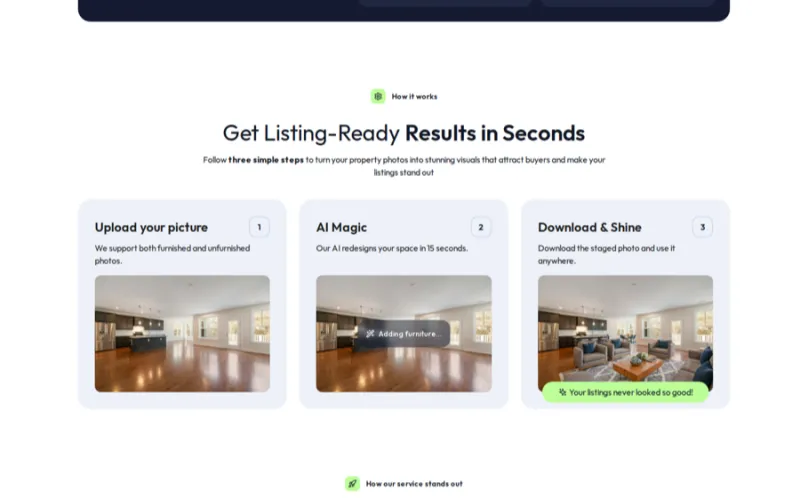
Overview. VirtualStagingAI is built around one thing: fully automatic, one-click staging in about 30 seconds with no design skills required. You upload the empty room, choose a style, and it returns a furnished photo — no drag-and-drop, no manual placement. It's the cheapest true per-image option we tested, which makes it ideal when you have a stack of vacant photos to clear before a listing goes live tonight. Photorealism is strong on standard rooms, occasionally weaker on very open or oddly-shaped spaces where a human designer would still win.
Fully automatic staging in ~30 seconds Furniture removal to clear cluttered rooms first Multiple styles & unlimited re-rolls on paid plans Free demo image before you pay
Realism in 2026
Excellent on standard bedrooms and living rooms; the fastest path from empty photo to MLS-ready image at the lowest price.
Fastest and cheapest per image Zero learning curve — true one-click Unlimited re-generations on subscriptions
Less control over exact furniture layout Can struggle with unusual room shapes
Pricing: Free demo image; subscriptions from roughly $16/month with unlimited photos, making the effective cost ~$1–$2 each. Who should pick it: agents and photographers who want the fastest, cheapest way to stage a batch of empty rooms.
Collov AI — Best affordable AI virtual staging
Best for: free/low-cost AI staging · ★★★★★ 4.6 · Free tier, then ~$1/image

Overview. Collov AI is the value pick: a polished, design-forward staging engine with a genuinely usable free tier and paid images that land around a dollar. It leans into interior-design quality — lots of curated styles and a clean editor — and markets hard on the "staged homes sell faster" angle that resonates with sellers. In testing it produced attractive, well-composed rooms; edges were occasionally a touch softer than REimagineHome, but for the price it's hard to beat, especially if you also want AI redesign and color/material swaps.
Free tier plus low-cost per-image pricing Design-forward styles & AI room redesign Material, color & furniture swaps Mobile-friendly web app
Realism in 2026
Attractive, design-led results at the lowest effective cost. Best bang-for-buck for agents staging on a tight budget.
Excellent value with a real free tier Strong interior-design aesthetic Redesign & swap features beyond staging
Edges occasionally softer than the top pick Free tier adds a watermark
Pricing: Free tier (watermarked); paid images from about $1 each on subscription. Who should pick it: budget-conscious agents who want good-looking AI staging plus redesign tools.
Homestyler — Best free DIY 3D room design
Best for: free hands-on 3D staging · ★★★★☆ 4.2 · Free plan available

Overview. Homestyler is different from the AI tools: it's a free, drag-and-drop 3D interior-design app where you build the room and drop in real furniture models, then render photorealistic views. It's more work than one-click AI, but you get total control over layout and a genuinely free plan — great for agents who enjoy design, want to show a floor plan furnished, or need a repeatable look. It's also handy for renovation "before/after" concepts. Just know it has a learning curve and isn't the fastest way to clear a batch of listing photos.
Free 3D room designer with real furniture models Photorealistic renders & 360° panoramas Floor-plan to furnished view Web + mobile apps
Realism in 2026
Renders look clean but read as 3D rather than photo-staged. Best for concept and control, not for editing an existing listing photo.
Genuinely free with full layout control Great for floor-plan-based staging Large furniture catalog
Learning curve; slower than AI Renders less photorealistic than AI staging
Pricing: Free plan; paid tiers unlock higher-res renders and more assets. Who should pick it: hands-on agents who want free, controllable 3D staging or to furnish a floor plan. Pair it with our AI floor plan generator guide.
Best virtual staging services (done-for-you)
Prefer to hand it off? Done-for-you services use human designers, so quality is consistently high and the tricky rooms AI stumbles on get handled properly. Turnaround is typically 24–48 hours at roughly $16–$40 per image — still a rounding error next to physical staging.
Styldod — Best service for style variety & Matterport
Best for: done-for-you style range · ★★★★★ 4.7 · From $16/image
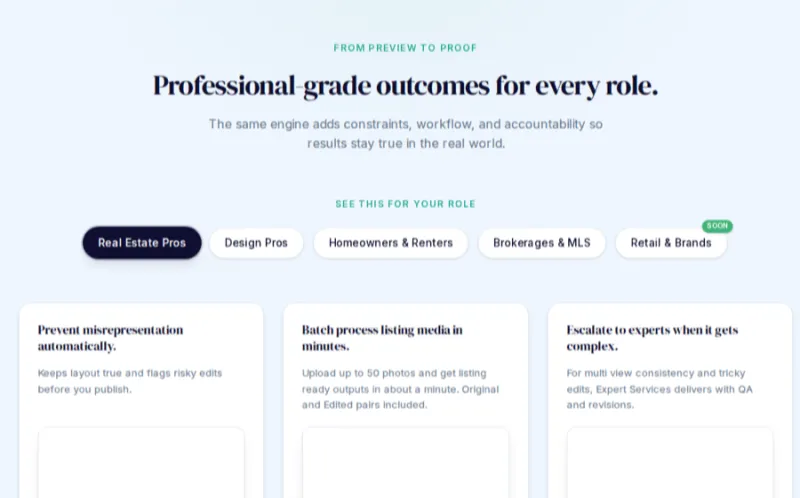
Overview. Styldod is the done-for-you service I recommend most for agents who want polished, human-quality staging without paying premium-agency rates. At around $16 per image it's one of the best values in managed staging, with a wide range of design styles, quick 1–2 day turnaround, and free revisions if the first pass isn't right. It also handles the rest of a listing's photo needs — image enhancement, item removal, day-to-dusk — and offers virtual staging for Matterport 3D tours, which most competitors don't.
Human designers, wide style variety Matterport / 3D tour virtual staging Full photo suite: enhancement, item removal, day-to-dusk Free revisions & ~24–48h turnaround
Realism in 2026
Consistent, MLS-ready results because a designer reviews every image — the safe choice for high-stakes listings.
Best value in managed staging Handles Matterport & full photo editing Free revisions until it's right
Slower than instant AI (hours, not seconds) Per-image cost adds up at high volume
Pricing: Virtual staging from $16/image; one free trial image. Who should pick it: agents who want reliable human-quality staging, Matterport support, and a one-stop photo editor.
BoxBrownie — Best all-in-one photo editing + staging
Best for: staging plus full photo editing · ★★★★★ 4.6 · From $24/image

Overview. BoxBrownie is the best-known name in real estate photo services, and for good reason: alongside human virtual staging (~$24/image, ~24-hour turnaround) it does image enhancement, item removal, day-to-dusk conversions, floor-plan redraws and even copywriting. If you want one vendor for your whole listing-media workflow — not just staging — BoxBrownie is the most complete option. Staging quality is excellent and consistent; the trade-off versus Styldod is a slightly higher price for a broader, more polished platform.
Human staging plus full photo-editing suite Day-to-dusk, item removal, floor-plan redraw ~24-hour turnaround with revisions Trusted by brokerages worldwide
Realism in 2026
Agency-grade output across the board; the most complete listing-media vendor if you want everything under one roof.
One vendor for staging + all photo edits Reliable, consistent, well-supported Great for teams standardizing listing media
Pricier per image than Styldod Not instant — turnaround in hours
Pricing: Virtual staging from $24/image; free trial credits. Who should pick it: agents and teams who want a single trusted vendor for staging and every other listing-photo edit.
PhotoUp — Best for high-volume teams & photographers
Best for: volume & editing workflow · ★★★★★ 4.5 · From $21/image

Overview. PhotoUp is built for people who process a lot of listings — real estate photographers, teams and brokerages. Its virtual staging is done by human editors (~$21/image), but the real draw is the surrounding workflow: bulk uploads, dedicated editing team, a media-delivery platform, plus HDR photo editing, video and even virtual-assistant services. If staging is one line item in a high-volume media pipeline, PhotoUp's project management and scale make it a strong operational fit.
Human staging built for bulk volume Full HDR photo editing & media delivery platform Dedicated editor & project management Real estate virtual assistants add-on
Realism in 2026
Solid human-quality staging with the best workflow tooling for teams that process dozens of listings a week.
Built for volume with dedicated editors Staging + HDR editing + video in one platform Great for photographers reselling to agents
Overkill for a solo agent with one listing Turnaround in hours, not instant
Pricing: Virtual staging from $21/image; trial credits for new accounts. Who should pick it: photographers, teams and brokerages that need staging inside a high-volume editing workflow.
roOomy — Best high-end & 3D / Matterport staging
Best for: luxury & shoppable 3D · ★★★★☆ 4.1 · ~$30/image (custom)
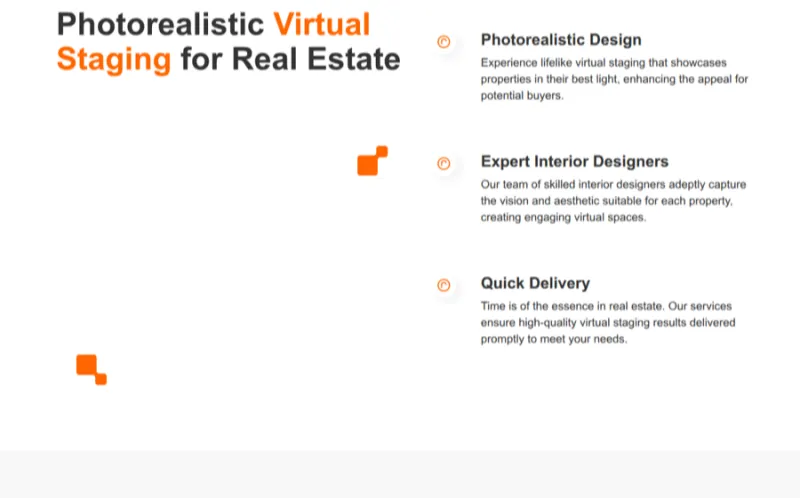
Overview. roOomy is the premium, design-heavy end of the market. It built its reputation on high-fidelity 3D staging and shoppable interiors for enterprise real estate and furniture brands, including immersive 3D and Matterport-style experiences rather than just flat photos. Output is beautiful and the 3D capability is genuinely differentiated, but it's aimed more at luxury listings, developers and brands than the everyday agent staging a $350k vacant — pricing is custom and higher, and it's less of a self-serve, do-it-tonight tool.
High-fidelity 3D & immersive staging Shoppable interiors & brand partnerships Matterport-style 3D tour staging Premium design quality for luxury listings
Realism in 2026
Gorgeous, high-end output and unique 3D depth — but priced and positioned for luxury and enterprise, not budget listings.
Best-in-class 3D and immersive experiences Premium look for luxury listings Shoppable / brand-integrated interiors
Higher cost, custom quotes Overkill for everyday vacant listings
Pricing: Custom; effective cost around $30+/image for premium 3D work. Who should pick it: luxury agents, developers and brands who want high-end 3D staging and immersive tours.
Best free virtual staging software
"Free virtual staging" is one of the most-searched terms in this category — and most competitor lists bury it. Here's the honest truth: several tools have real free options, but none give you unlimited, watermark-free, high-resolution MLS images for $0 forever. Here's what "free" actually means for each:
Homestyler — the only genuinely free, ongoing option. Build and render furnished rooms in 3D at no cost; you trade time and a learning curve for zero spend. Collov AI — a real free tier with AI staging; outputs are watermarked and lower-res until you upgrade (from ~$1/image). REimagineHome — free starter credits let you stage several photos before paying, so you can test-drive the best AI quality for free. VirtualStagingAI — a free demo image (watermarked) so you can preview the result before subscribing. Styldod & BoxBrownie — human services that give you one free trial image so you can judge quality risk-free.
Cheapest MLS-ready path: use free credits/trials to stage your first listing, then move to an AI subscription (Collov or VirtualStagingAI from ~$16/month unlimited) — that's effectively under $1 per finished, watermark-free image. Watch out for free tools that leave a watermark; you cannot post a watermarked photo to the MLS.
Best virtual staging app (stage from your phone)
Sometimes you're standing in an empty room at a listing appointment and want to show the seller the potential right now. Several tools work great from a phone:
VirtualStagingAI — snap the empty room, upload from your phone, and get a staged image in ~30 seconds. The best pure mobile staging experience. Collov — mobile-friendly web app; stage and redesign on the go with a free tier to start. Homestyler — dedicated iOS/Android apps for building 3D rooms and AR previews from your phone. REimagineHome — no app needed; it runs in any mobile browser, so you can stage from your phone at the property.
For a real listing you'll still want to finalize on a laptop at full resolution before uploading to the MLS — but for winning the listing appointment, staging live on your phone is a genuine closing tool.
Virtual staging for listing videos
Here's the gap no staging tool fills: they all produce still images, but buyers increasingly scroll video and reels, and Zillow, YouTube and social reward motion. Staged photos get the click; a staged video walkthrough gets the showing. So the winning 2026 workflow is two steps — stage your stills with the tools above, then turn them into a cinematic listing video.
Turn staged photos into cinematic listing video — VideoTour.ai
VideoTour.ai animates your virtually staged listing photos into a smooth, narrated property walkthrough in minutes — ready for Zillow, YouTube, Instagram Reels and your CRM's follow-up. It's the natural next step after staging: same photos, far more reach.
One caution: keep the staged furniture consistent between your photos and your video, and disclose virtual staging on the video too. A staged video that matches the staged stills feels honest and premium; a mismatch confuses buyers.
What is virtual staging? (buyer's guide)
Virtual staging is the process of digitally adding furniture, decor and styling to a photo of an empty or dated room so buyers can picture living there — without moving a single physical item into the home. Instead of renting real furniture, you (or an AI/designer) edit the listing photo itself. The result looks like a professionally furnished room, but it exists only in the image. It's now standard practice for vacant listings because 95%+ of buyers judge a home by its online photos first.
How AI virtual staging works
Modern AI staging tools use computer vision to understand a room from a single photo: they detect the floor, walls, windows and perspective, estimate the lighting, and then generate furniture that fits that exact space with correct scale, shadows and reflections. You upload an empty-room JPG, choose a style and room type, and the model composites believable furnishings into the image in seconds. The best tools (like REimagineHome) also let you remove existing furniture first, so you can "re-stage" an already-furnished but dated room. Results are only as good as the source image, though — a bright, straight, wide shot stages dramatically better than a dark phone snap, so it's worth a pass through our real estate photography guide before you upload.
Traditional vs virtual staging (cost & time)
The math is the reason virtual staging exploded. Physical staging means renting real furniture and paying a stager to install and later remove it — beautiful in person, but slow and expensive. Virtual staging delivers the same emotional pull in your online photos for pennies on the dollar.
| Factor | Physical staging | Virtual staging |
|---|---|---|
| Cost | $1,000–$5,000+ per listing | $1–$40 per photo |
| Turnaround | Days to schedule & install | Seconds (AI) to 48 hours (service) |
| Where it helps | In-person showings | Online listing photos & video |
| Flexibility | One look, hard to change | Restage in any style instantly |
| Disclosure | Not required | Must label as virtually staged |
Many top agents do both: virtually stage all the online photos, and lightly physically stage one or two key rooms for showings. For truly vacant listings on a budget, virtual staging alone is usually enough to stop the scroll.
Does staging actually help sell?
Yes — and the data backs it up. According to the National Association of REALTORS®, staging makes it easier for buyers to visualize a property as their future home, and a large share of buyers' agents report that staging increases the offer amount and helps homes sell faster. Empty rooms photograph small and cold; a staged room gives buyers a sense of scale, function and lifestyle. When the vast majority of buyers begin online, staged photos are the single cheapest lever you have to increase clicks, showings and perceived value.
Is virtual staging legal? MLS disclosure & ethics
Virtual staging is completely legal and ethical — as long as you disclose it and don't use it to deceive. The line is simple: you may use staging to show a room's potential, but never to hide its problems. The NAR Code of Ethics and virtually every MLS require that any materially altered photo be clearly labeled so buyers aren't misled.
How to disclose virtually staged photos (MLS & Zillow)
Caption every edited image. Add a visible label such as "Virtually staged" (many agents add a small on-image watermark or a text overlay) so it's unambiguous. Note it in the listing remarks. A line like "Some photos are virtually staged" in the MLS description covers you. It carries to the portals. Zillow, Realtor.com and Redfin pull MLS photos and captions, so a proper MLS disclosure flows through to the sites buyers actually browse. Include a real, un-staged photo too. Show at least one empty shot of each staged room so buyers see the true condition.
Do's & don'ts of virtual staging
Show potential — furnish empty rooms to realistic scale Keep the walls, floors, windows & fixtures exactly as they are Disclose clearly on every staged image
Hide defects — cracks, water stains, dated finishes Change the structure, remove walls or fake a view Over-furnish so a small room looks larger than it is
Follow those rules and the "won't buyers feel tricked?" objection disappears — buyers understand staging is about visualization, and honest disclosure builds trust rather than eroding it.
How to choose the right virtual staging software
With eight strong options, the decision comes down to five questions:
One-off? Use free AI credits. Many listings a month? An unlimited AI subscription or a volume service like PhotoUp pays off.
Tight budget → Collov / VirtualStagingAI. Premium listing where quality is everything → Styldod, BoxBrownie or roOomy.
Want it now and love control → AI. Want a designer to guarantee quality → done-for-you service.
Listing goes live tonight → AI. Have a day or two → a service gives you consistent human quality.
Need motion for reels & Zillow → stage stills, then animate with VideoTour.ai.
My default recommendation for a typical agent: start with REimagineHome or VirtualStagingAI's free credits, upgrade to an unlimited AI plan once you're staging regularly, and keep Styldod on speed-dial for the high-stakes listing where you want a human to guarantee the result.
More virtual staging tools worth a look
The eight tools above are the ones we've fully tested on our control photos, but the virtual staging market is moving fast. These are newer or adjacent tools we've researched — pricing, features and user feedback — but haven't yet put through our full hands-on test. They're worth a look if the main picks don't fit your budget or workflow, and several offer free credits so you can judge the output on your own listing photos.

One-click AI virtual staging with 18,000+ furniture pieces and photorealistic renders back in about 10 minutes.

Budget AI toolbox for listing photos — virtual staging, item removal, enhancement, and renovation from $0.24 per photo.

All-in-one listing visuals: AI staging, furniture removal, renovation previews, videos, and 360 tours trusted by 20,000+ agents.

AI media workspace for realtors that combines virtual staging with magic eraser, retouching, video, and floor plan tools.

Patented DIY browser staging: drag and drop 5,000+ furniture items onto your photos and download instantly — no waiting.

Stage empty rooms, redesign interiors, and generate property videos from a photo, sketch, or prompt in about 60 seconds.

Snap a photo and instantly show buyers a remodeled version — new flooring, walls, roof, paint, landscaping, and staging.
Frequently asked questions
REimagineHome is our best overall pick — it delivers the most photorealistic AI staging with the widest style range. VirtualStagingAI is best for speed and cheap per-image pricing, Collov AI is the best affordable all-rounder, and for done-for-you human quality choose Styldod or BoxBrownie. See our comparison table for the full ranking.
Yes. REimagineHome, VirtualStagingAI and Collov AI offer free trials or credits, and Homestyler is genuinely free for DIY 3D room design. Free tiers usually add a watermark or limit resolution, which you remove by upgrading to a paid plan from around $16–$29/month. See our free virtual staging section.
AI virtual staging runs about $1–$10 per image, or a flat $16–$75/month for unlimited or high-volume plans. Done-for-you human services like Styldod, BoxBrownie and PhotoUp cost roughly $16–$40 per photo with 24–48 hour turnaround. Physical staging, by comparison, costs $1,000–$5,000+ per listing.
For most vacant or dated listings, yes. Staged homes sell faster and buyers struggle to picture furniture in an empty room. At roughly $1–$40 per photo versus $1,000+ for physical staging, virtual staging delivers the same emotional pull at a fraction of the cost, which is why it's become standard for online listing photos.
Top AI tools in 2026 produce photorealistic results most buyers can't distinguish from physical staging, as long as you keep furniture to realistic scale and don't alter walls, floors or fixtures. Buyers only feel tricked when staging hides defects or misrepresents the space — which is exactly why you must disclose that photos are virtually staged.
Yes. Nearly every MLS and the NAR Code of Ethics require you to clearly label virtually staged photos so buyers aren't misled. Add a caption such as "Virtually staged" on each edited image and note it in the listing remarks. Zillow and Realtor.com display MLS photos and captions, so the disclosure carries through. See our disclosure guide.
Physical staging places real furniture in the home — it costs $1,000–$5,000+, takes days to install, and helps in-person showings. Virtual staging digitally adds furniture to listing photos for $1–$40 each in hours, and helps the online photos that 95%+ of buyers see first. Many agents virtually stage the photos and lightly physically stage key rooms.
Yes. VirtualStagingAI, Collov and Homestyler offer mobile apps or mobile-friendly web tools, so you can photograph an empty room and stage it from your phone during a showing. REimagineHome also works from any mobile browser with no install required. See our virtual staging app section.
REimagineHome is our top AI pick for photorealism and design control, followed by VirtualStagingAI for one-click speed at about $1–$2 per image and Collov AI for affordable unlimited staging. All three are self-serve — you upload an empty-room photo and get a furnished result in under a minute.
Most staging tools only produce still images, but buyers increasingly scroll video and reels. The practical workflow is to virtually stage your listing photos, then turn them into a cinematic walkthrough with VideoTour.ai, which animates staged stills into a narrated property video for Zillow, YouTube and social.
Final verdict: our top picks
If you want one answer: REimagineHome is the best virtual staging software for most realtors in 2026 — the most photorealistic AI results with the widest style control, for a couple of dollars a photo. Want the fastest, cheapest one-click images? VirtualStagingAI. Best free/affordable AI? Collov. Prefer a designer to do it for you? Styldod (best value) or BoxBrownie (most complete). High volume? PhotoUp. Luxury 3D? roOomy. And free DIY? Homestyler.
Whichever you choose, remember staged stills are only step one. Turn them into a cinematic walkthrough with VideoTour.ai, disclose your staging honestly, and your vacant listings will photograph — and sell — like homes people can already picture living in.
Related tools & guides
Round out your listing-marketing stack with our other hands-on guides and the full directory:
Best AI tools for realtors — the pillar guide to every category. Best real estate photo editing software — enhance, declutter and day-to-dusk your listing shots. Best real estate lead generation software — fill your pipeline with the listings to stage. Best AI floor plan generator — turn a sketch or scan into an MLS-ready floor plan. Best real estate CRM — the system that follows up on every lead your listings generate. Explore the full tools directory, read in-depth tool reviews, or dive into the blog for how-tos.